Showing posts with label Python. Show all posts

Sunday, September 29, 2013

Python Loop Condition and ErrorHandling


Simple Note

Code

# display message and wait for input
# input is always a string
# ref http://stackoverflow.com/questions/5424716/python-how-to-check-if-input-is-a-number-given-that-input-always-returns-stri
x = input("Please enter an integer, or q to stop: ")
sum = 0
# while input is not 'q'
while x != 'q':
  try: # try to convert x to integer
    x = int(x)
    if x < 0:
      x = 0
      print('Negative changed to zero')
    elif x == 0: # keyword 'elif' is short for 'else if'
      print('Zero')
    else:
      print('positive')
    sum += x
    print('sum = ' + str(sum))
    x = input() # wait for next input
  except ValueError: # error happened when convert x to integer
    x = input("Please enter an integer, or q to stop: ")


Result


References

Python Doc:
http://docs.python.org/3/tutorial/controlflow.html

Python - How to check if input is a number
http://stackoverflow.com/questions/5424716/python-how-to-check-if-input-is-a-number-given-that-input-always-returns-stri

Download

Code at github
https://github.com/benbai123/Python/blob/master/Practice/Basic/flow_control/input_loop_condition_error-handling.py


Sunday, September 22, 2013

Python Basic Math Operators and Functions


Simple Note

Code

# ref:
# number concat string
# http://stackoverflow.com/questions/6981495/how-can-i-concatenate-a-string-and-a-number-in-python
#
# Complex Number
# http://en.wikipedia.org/wiki/Complex_number
#
# Python doc:
# http://docs.python.org/3/tutorial/introduction.html
# http://docs.python.org/3/library/stdtypes.html#typesnumeric
# 

# +, -, *, /
print()
print(" +, -, *, /")
print("    3+3 = " + str(3+3)) # 6
print("    3-3 = " + str(3-3)) # 0
print("    3*3 = " + str(3*3)) # 9
print("    3/3 = " + str(3/3)) # 1.0

# +, -, *, / with ()
print(" +, -, *, / with ()")
print("    (4+5)*3 = " + str((4+5)*3)) # = 9*3 = 27

# negated
print(" negated")
x = 5;
print("    x = 5, -x = " + str(-x)) # -5

# use equal sign to assign value
print(" use equal sign to assign value")
a = 2
b = 3
print("    a=2, b=3, a*b = " + str(a*b)) # 6

# absolute value
print(" absolute value")
print("    abs(5) = " + str(abs(5))) # 5
print("    abs(-5) = " + str(abs(-5))) # 5

# division always returns a floating point number automatically
print(" division always returns a floating point number automatically")
print("    8/5 = " + str(8/5)) # 1.6
print("    32/3 = " + str(32/3)) # 10.666666666666666

# floor division
print(" floor division")
print("    8//5 = " + str(8//5)) # 1
print("    32//3 = " + str(32//3)) # 10

# MOD (the remainder of the division)
print(" MOD (the remainder of the division)")
print("    32%3 = " + str(32%3)) # 2

# the pair (x // y, x % y)
print(" the pair (x // y, x % y)")
print("    divmod(32, 3) = " + str(divmod(32, 3))) # (10, 2)

# floor to specific digits with round()
print(" floor to specific digits with round()")
print("    round(8/3, 2) = " + str(round(8/3, 2))) # 2.67

# complex number with real part re, imaginary part im. im defaults to zero
print(" complex number with real part re, imaginary part im. im defaults to zero")
print("    complex(1, 2) = " + str(complex(1, 2))) # (1+2j)

# power
print(" power")
print("    2**5 = " + str(2**5)) # 32
print("    pow(2, 5) = " + str(pow(2, 5))) # 32

# converted to integer
print(" converted to integer")
print("    int(1.23) = " + str(int(1.23))) # 1

# converted to floating point
print(" converted to floating point")
print("    float(5) = " + str(float(5))) # 5.0


Result


References

number concat string
http://stackoverflow.com/questions/6981495/how-can-i-concatenate-a-string-and-a-number-in-python

Complex Number
http://en.wikipedia.org/wiki/Complex_number

Python doc:
http://docs.python.org/3/tutorial/introduction.html
http://docs.python.org/3/library/stdtypes.html#typesnumeric

Download

Test folder at github
https://github.com/benbai123/Python/tree/master/Practice/Basic/Math/Simple_Calculation

Sunday, September 8, 2013

File Access in Python


Simple Note

Code

import os

# get path of the folder contains this script
pathToCurrentFolder = os.path.dirname(os.path.abspath(__file__))
# open test.txt in read mode
f = open(pathToCurrentFolder + '/test_files/test.txt', 'r')
# create output.txt (write mode)
o = open(pathToCurrentFolder + '/test_files/output.txt', 'w')
# create output2.txt (write mode)
o2 = open(pathToCurrentFolder + '/test_files/output2.txt', 'w')

idx = 1

print('current folder: ' + pathToCurrentFolder)

# get all content of test.txt
content = f.read()

print('write all content to test_files/output.txt')
# write content to output.txt
o.write("content from test.txt: " + content)

# go to head of test.txt
f.seek(0)

print('write each line with line number to test_files/output2.txt')
# for each line in test.txt
# write line with line number into output2.txt
for line in f:
    o2.write(str(idx) + '\t' + line)
    idx += 1
# or call o2.write(f.readline()) three times


Reference

How to get full path of current directory in Python?
http://stackoverflow.com/questions/3430372/how-to-get-full-path-of-current-directory-in-python

Reading and Writing Files
http://docs.python.org/3/tutorial/inputoutput.html#reading-and-writing-files

Download

Test folder at github
https://github.com/benbai123/Python/tree/master/Practice/Basic/file_access

Saturday, August 31, 2013

Execute Python Script in Windows


Simple Note

Simply type FILE_NAME.py then press Enter in cmd.

Code:

helloworld.py

h = "hello"
w = "world"
print(h + " " + w + "!")


Result:


Download:

https://github.com/benbai123/Python/blob/master/Practice/Basic/execute_script_file/helloworld.py

Reference:

http://docs.python.org/3.3/tutorial/interpreter.html

Execute System Command in Python


Simple Note

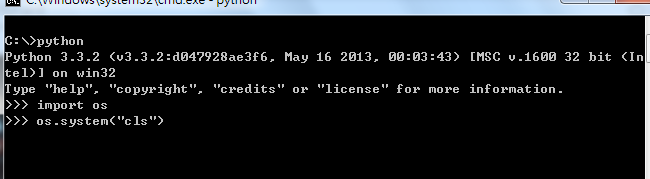
(Assume the command that can clear screen called cls and you want to clear screen in Python Interactive Mode)

import os lib then call os.system(COMMAND) as below:

Before:


After:


Python Getting Started


Simple Note

Steps

1. Go to download page (http://www.python.org/download/ for now) and download what you need (I choose Python 3.3.2 Windows x86 MSI Installer).

2. Execute downloaded file to install Python (Assume you installed it at C:\Python33).

3. Open command line and
    * Option A: go to the installed location (Assume C:\Python33)
    * Option B: type set path=%path%;C:\Python33 (for Windows) to make it accessible anywhere

4. Type "python", press Enter, type "help()", press Enter.


5. Go to tutorial page displayed in help message.

6. Go through tutorial to learn it.